
Nyshporka 0.37 — beta: several families in one Workshop, a new look, faster search
Contents
This is the biggest Nyshporka release. It is for those who research more than their own family: for genealogists who take on commissions, and for those who look for relatives, friends or neighbours from the same village. We reworked the look of the app and made search faster. And from this release Nyshporka is in beta.
Why beta
From 0.37 Nyshporka is in beta. For you this means the following:
- The look and the way of working will no longer change radically.
- New features accumulate and come out together in big releases, not every few days as before.
- Bug fixes come out at once, as separate small updates.
- Your data (read texts, canon, case registry) moves from version to version with the update command, with no manual work.
Several families in one Workshop
Until now one Nyshporka workspace meant one family. Whoever took a commission or searched for a wife's family had to either mix everything in one place or keep two copies of the read texts.
Now there are a Workshop and projects. The Workshop is the shared material: scans, read texts, the case registry, models. A project is a family or a commission: its own canon, its own hypotheses, its own reports. A case read once can be searched from any project, and there is no need to read it a second time.
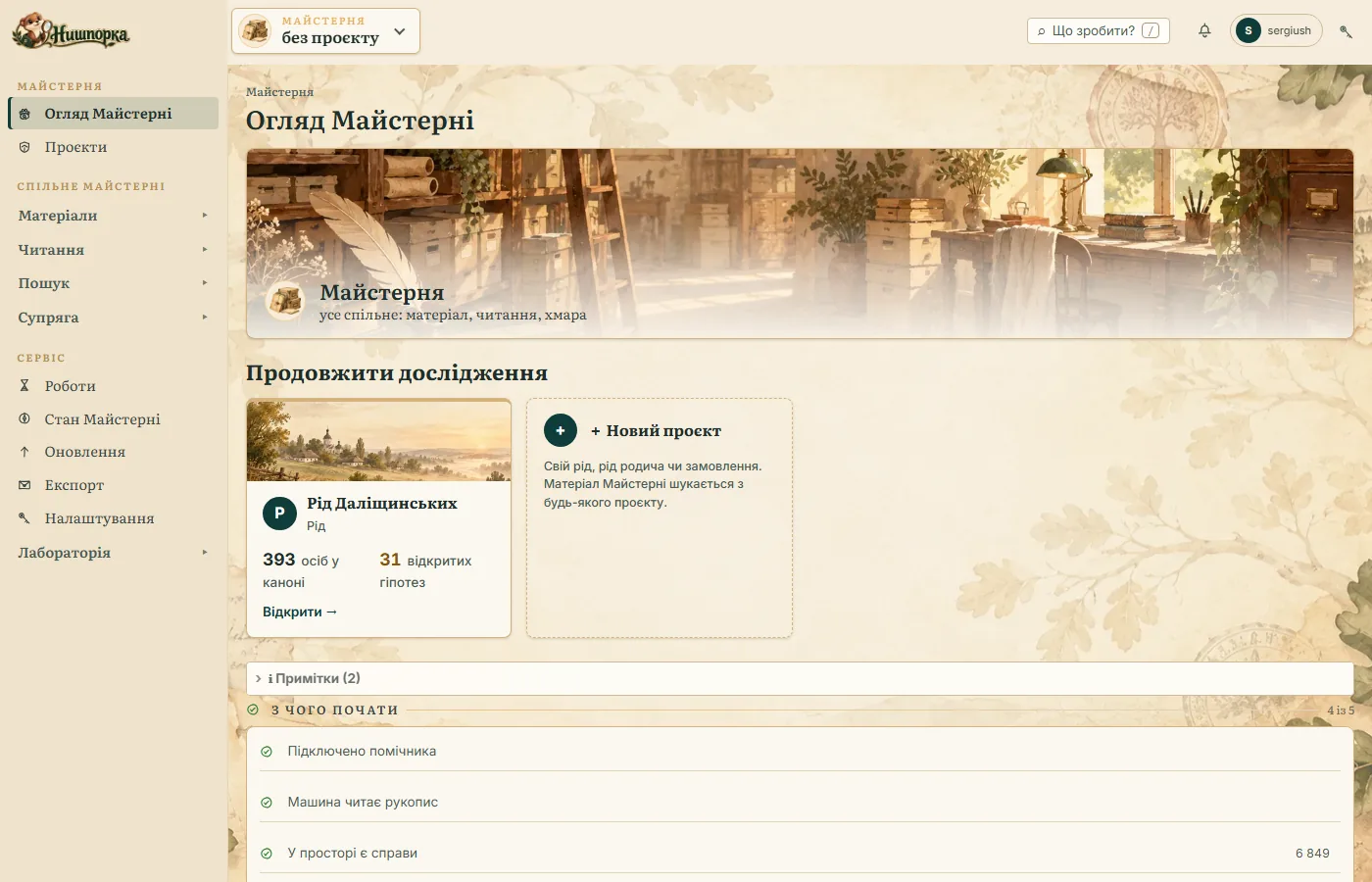
What this gives in practice:
- “Searched” — for each family separately. The Case library shows which read cases this family has not searched yet. A case searched for the Ivanenkos stays unsearched for the Petrenkos.
- “Already in another family's canon”. If the line you found has already been cut out as evidence in another project, the search will say so and let you go there.
- Who we are reading for. When reading a case you can name the client's project. The cloud counts costs by project, so you can see how much each commission cost.
- Private cases. A client's case can be marked “goes nowhere from this machine”. Then Nyshporka will not give it to Supriaha without your separate decision, and the public family site will show neither its reference nor crops from it. A commission project marks new cases this way by itself.
- Two tabs — two families. There is one app for the whole Workshop, and each browser tab can work with its own project.
A new project is created with the “New project” button in three steps: family or order, name and surname, colour and mark.
Important: after updating, move your family into a project. If you installed Nyshporka earlier, your family lies directly in the workspace. Moving it is a required step of the move to 0.37, even if you have only one family. The old workspace still works, so that you can move when it suits you, but Nyshporka 0.37 and later releases are built around projects.
The move takes a few minutes. Nyshporka first shows the plan and makes an archive, and everything can be put back with one command. How to prepare, what you will see on the screen, what to do afterwards and how to put it back: How to move a family into a project — step-by-step guide.
For those installing for the first time
A fresh Nyshporka no longer opens with an empty overview. It takes you through a short welcome of a few steps:
- The language of the app.
- Appearance: light, dark or like the system.
- The assistant (Claude or Codex) and how to connect it.
- The first project: name, the family surname, how else it was written.
- Family: villages with other names, and the district, years to search, archives with fonds.
- Where to get cases from: your own scans, archive catalogues, read texts from Supriaha, or a sample to try.
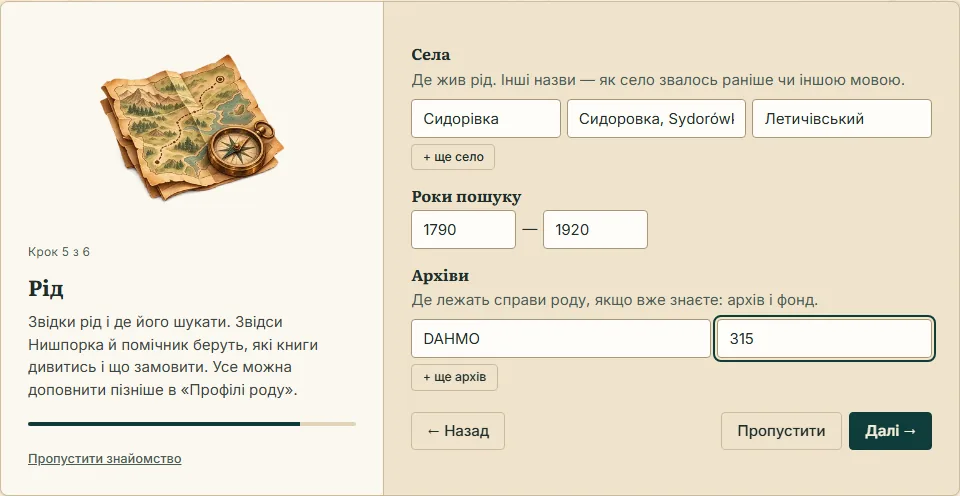
Every step except language and appearance can be skipped and filled in later. Villages, years and archives can now also be edited in the “Family profile” with an ordinary form. The overview of a new family shows the plan in the same order: family, cases, reading, search. You can go through the welcome again in Settings.
Before the release we went through Nyshporka through the eyes of a person who had just installed it, and removed the places where such a person got stuck:
- Engines and models are installed from the console. The machine check has the buttons “Install the engines” and “Download the models”, and progress is visible in the same row. The terminal is no longer needed for this.
- Catalogues say that a case has already been read in Supriaha. Above the results a bar appears, “cases already read: N”, with a link to “Take”. A case you have taken is at once in the Case library, even if the frames are not yet on the machine.
- The first evidence for the canon — without the assistant. In the “Evidence for the canon” window you can leave the card empty: then a new person is created.
A new look
The app has been reworked from the menu to the icons.
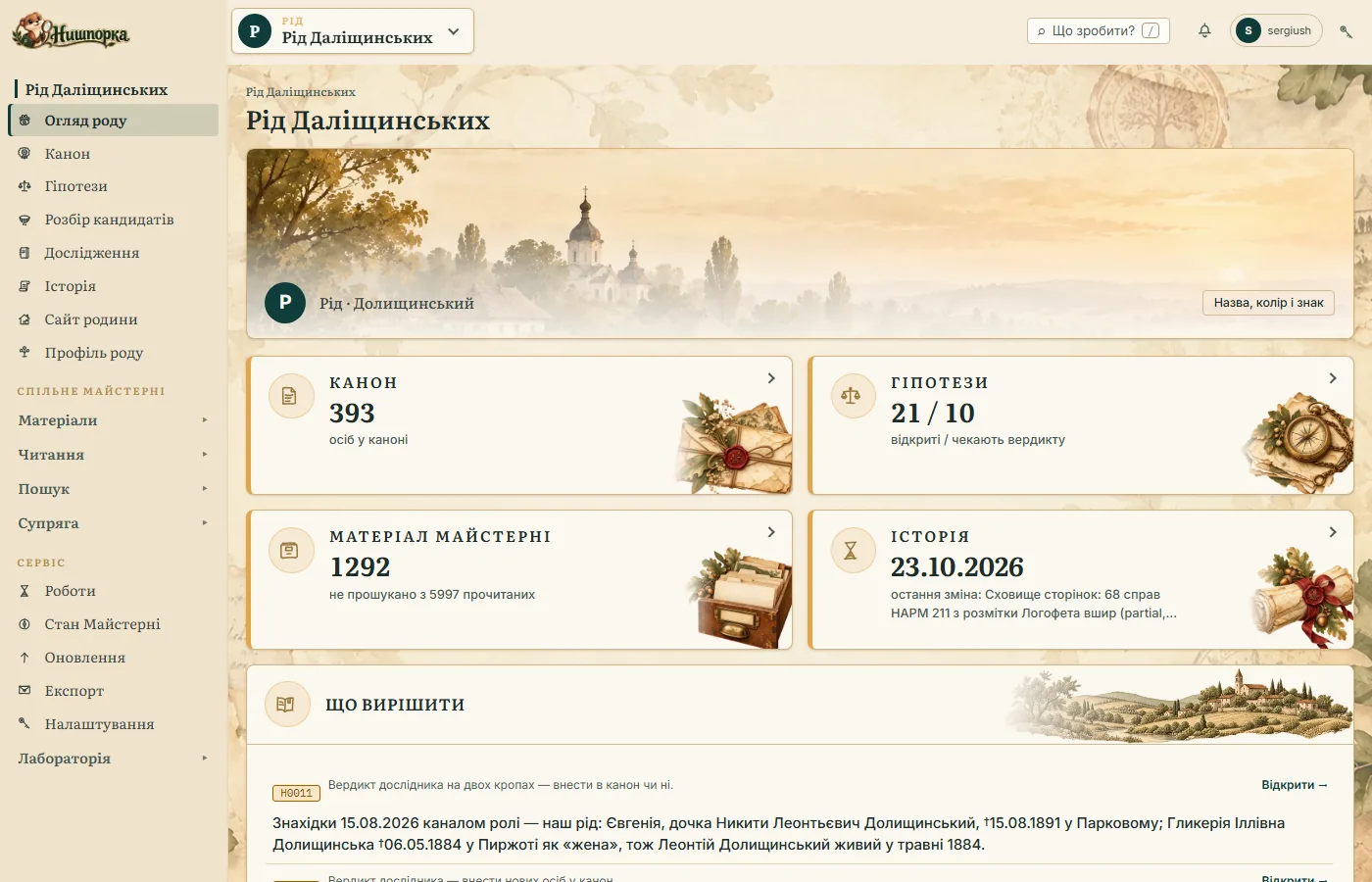
- A side menu instead of two rows of tabs. At the top is your family (overview, canon, hypotheses, candidate review, research, history, family site), below it what is shared in the Workshop (materials, reading, search, Supriaha).
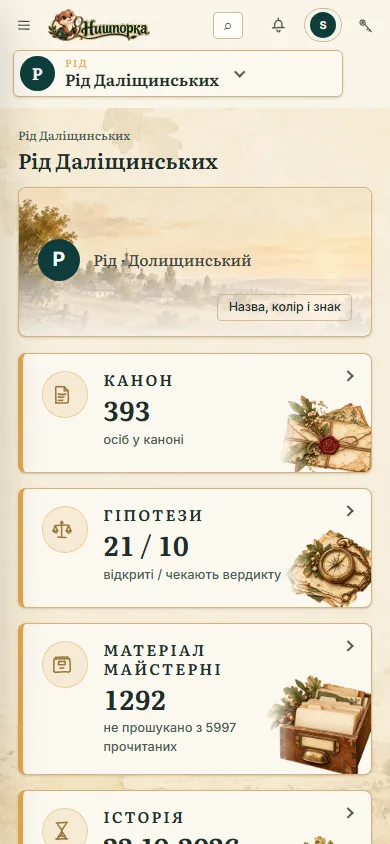
- The family overview shows at once what is in the canon, how many hypotheses are waiting for your decision and how many read cases the family has not searched yet.
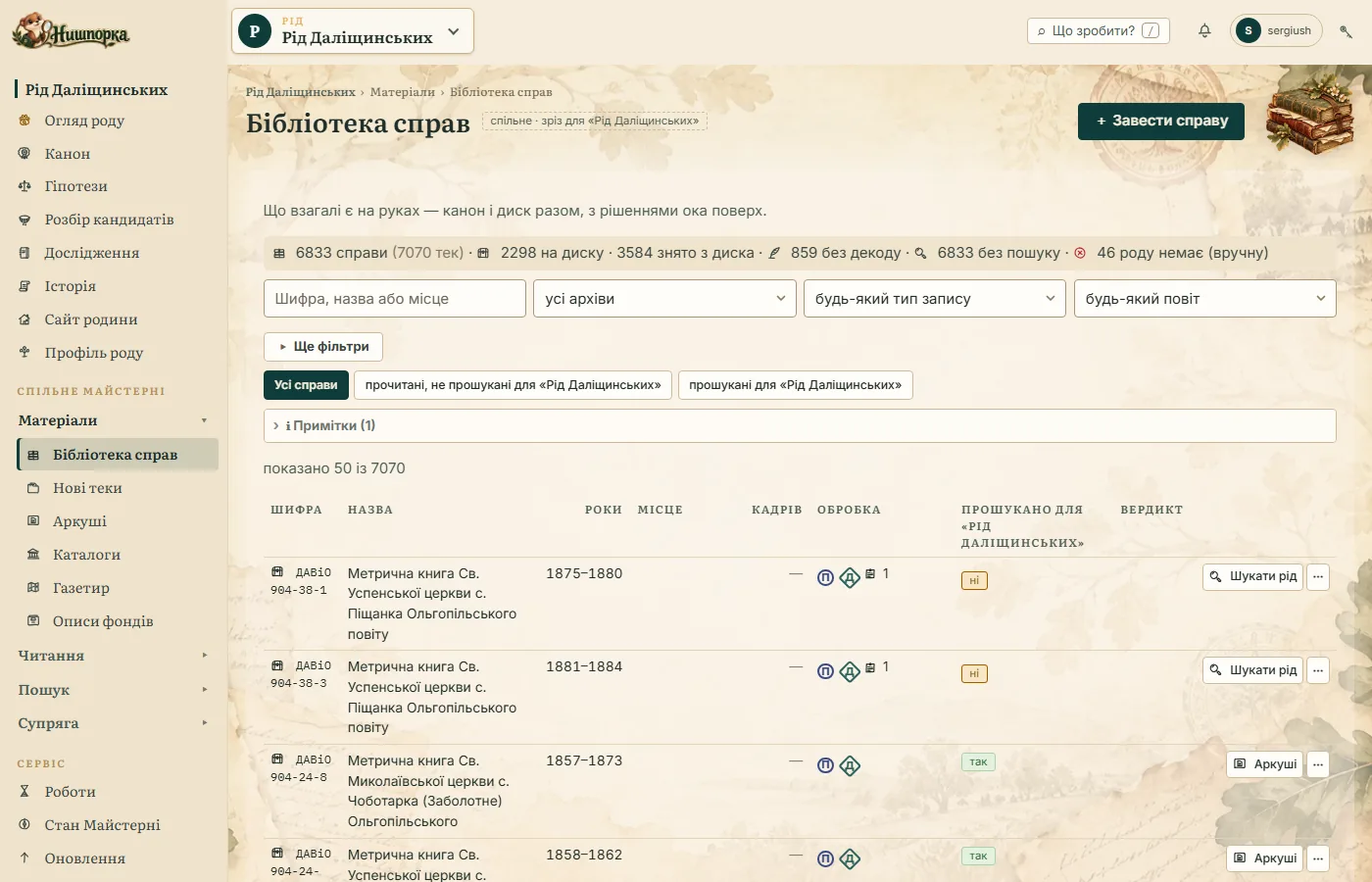
- The case library. The “read, not yet searched” slice in one click. In each row there is one action, depending on the state of the case: “Read”, “Find the family” or “Sheets”.
- Canon and hypotheses — in full. The canon shows all the cards, not the first two hundred: in groups by kind, with tiles “with evidence”, “without evidence”, “private” and search by names and spelling variants. Hypotheses are grouped by state, and they can be searched too.
- “Give” to Supriaha — grouped by archive. Filter tiles with numbers, search and a slice “only what is not yet in Supriaha”. Nothing is marked by itself: you decide what to give. Giving runs as a job, so you can see how many cases have already been given, and you can stop it.
- Reading — four steps: case, how to read, check, start. The cloud stands next to the start, and you see the estimate first. A card is rented only after your “yes”.
- The icons are a researcher's things: a bundle of cases, a card-catalogue drawer, a goose quill, a magnifying glass, a wax seal, a family tree. Headings are set in Literata, a typeface made for reading from a screen.
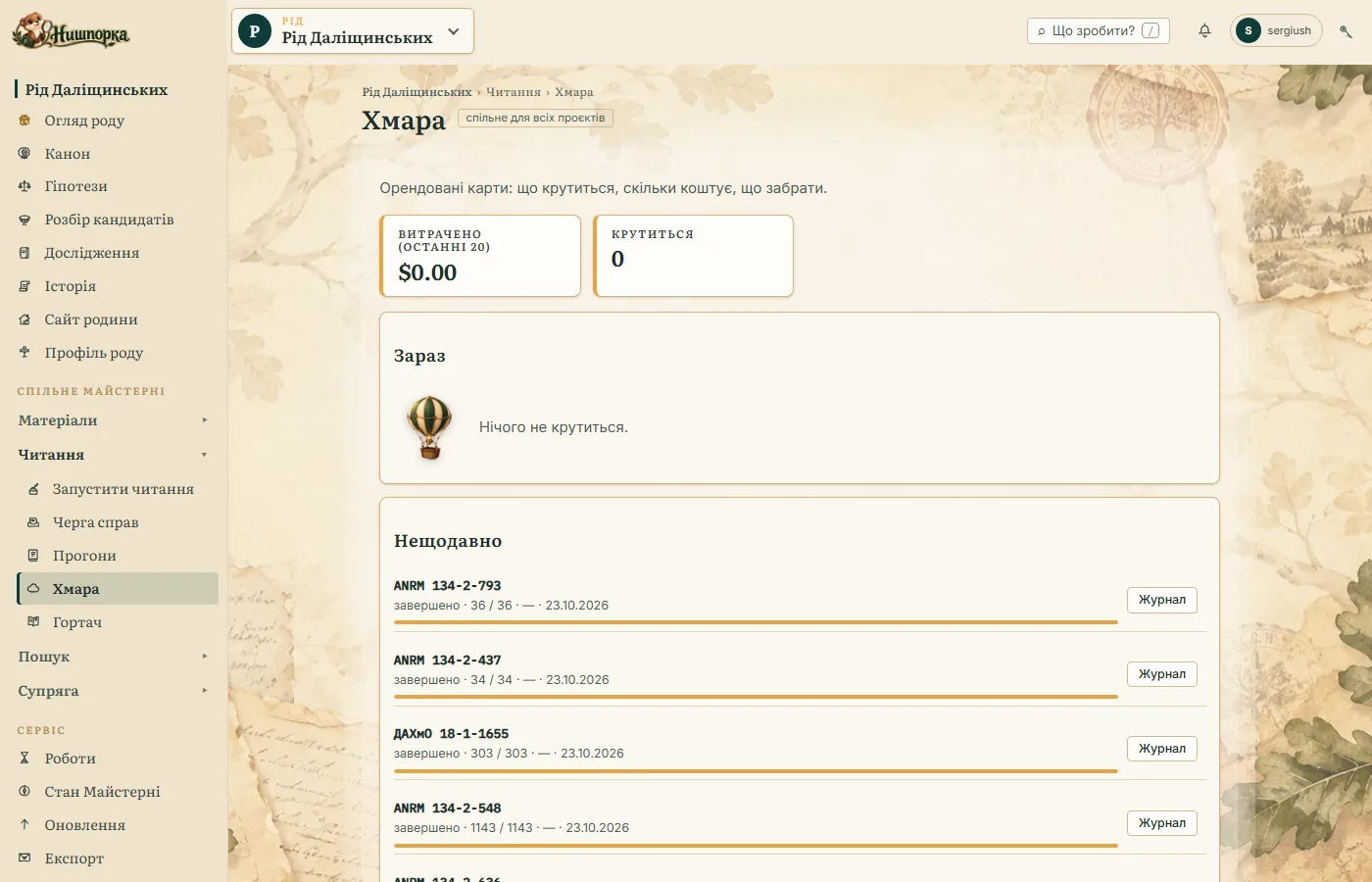
- Painted thumbnails. Every screen has its own picture, painted in watercolour and gouache on paper: a hot-air balloon for the Cloud, a sieve for candidate review, a cottage for the family site, a lamp where it is still empty.
- Progress is shown by a bar. How many pages of a case have been read, how many frames the cloud has gone through. If the cloud failed, it says in words what happened and when.
- In plain language. A case is labelled with its reference and title, not a folder path. Dates are everywhere in the format dd.mm.yyyy. History shows what changed (“sheet records, evidence”), not technical marks.
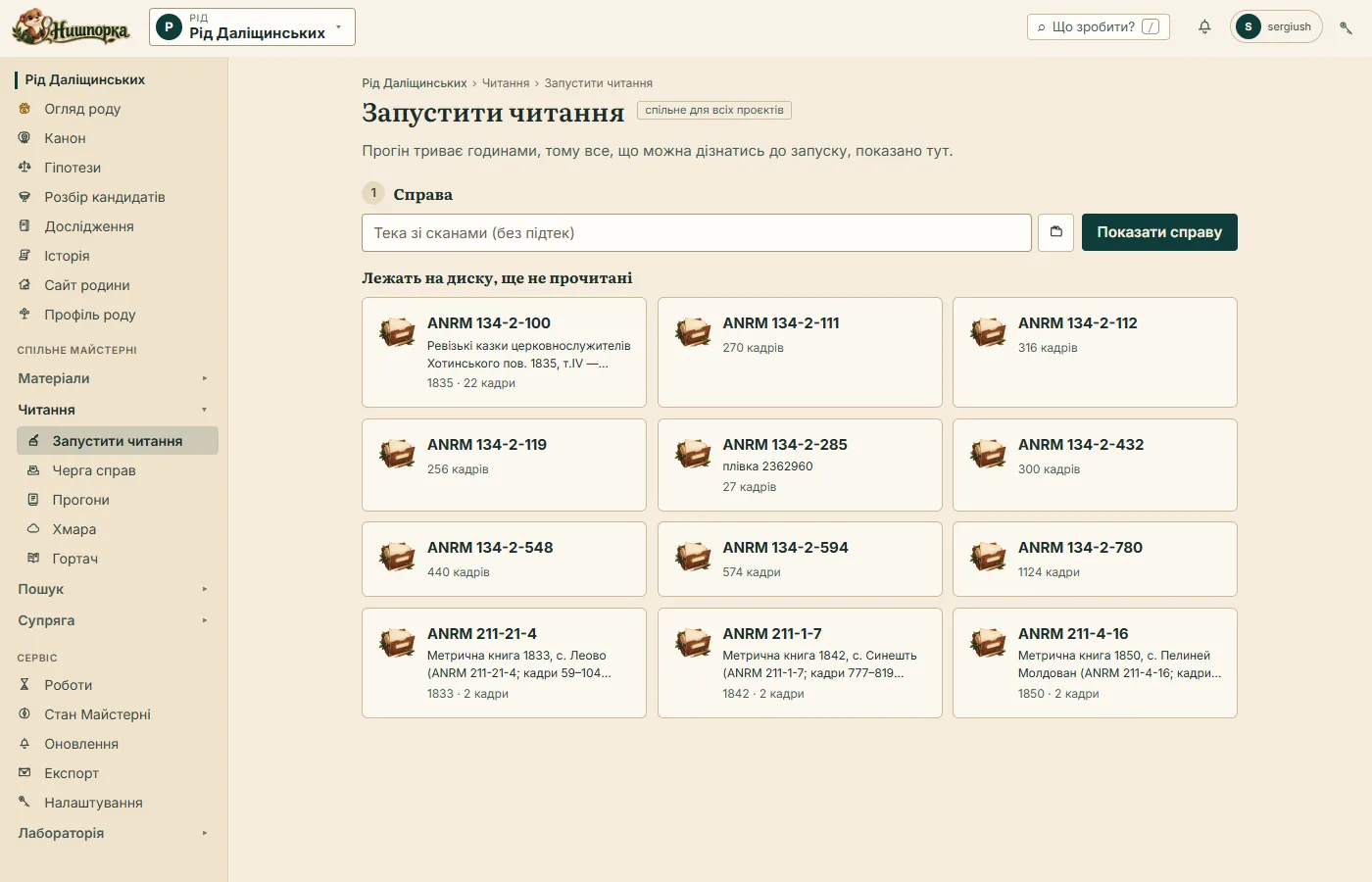
The cloud now has its own screen. It shows how much has been spent, what is being read now and what can be collected. The “Stop the rent” button is there too.
On a phone the menu slides out and tables turn into cards. You can check the state of reading or a hypothesis without going to the computer.
The app does not make you wait
- Slow lists open at once from the last answer with the mark “Refreshing…”, and the fresh data is pulled in by itself.
- A family canon of 900 cards opens in a fraction of a second, not in 10–25 s.
- “Give” to Supriaha opens in 2–3 s, and on a repeat visit in a fraction of a second. Before, on a large Workshop it took over a minute.
- The list of read texts after a new run is built twice as fast. Because of this Runs, the viewer, “Give” and search open faster.
- After every action the app says what happened: “Saved”, “Restored”, “No changes”. If an action fails, the reason is written in words, not as an error code.
Updating in one click
Until now you learned about a new release from a group or a letter, and updated with a command. Now Nyshporka itself will tell you about what is new.
- The bell in the header lights up when a new version is out, when reading models appear that are not yet on your computer, and when a notification is waiting for you in your Supriaha account.
- The “Updates” screen (the “Service” menu) shows which version is installed, which is out and what is new in it. Every release is described briefly, and “More on the portal” leads to a page like this one. A new reading model can be downloaded right there, with one button.
- “Update now”. Nyshporka shows what exactly it will install, and after your “yes” it closes, updates and opens again. While the update runs, the page shows the steps. If something fails, Nyshporka opens with the previous version and shows what went wrong. The button works if Nyshporka was installed with the installer. If you installed it another way, the screen gives you the command for updating.
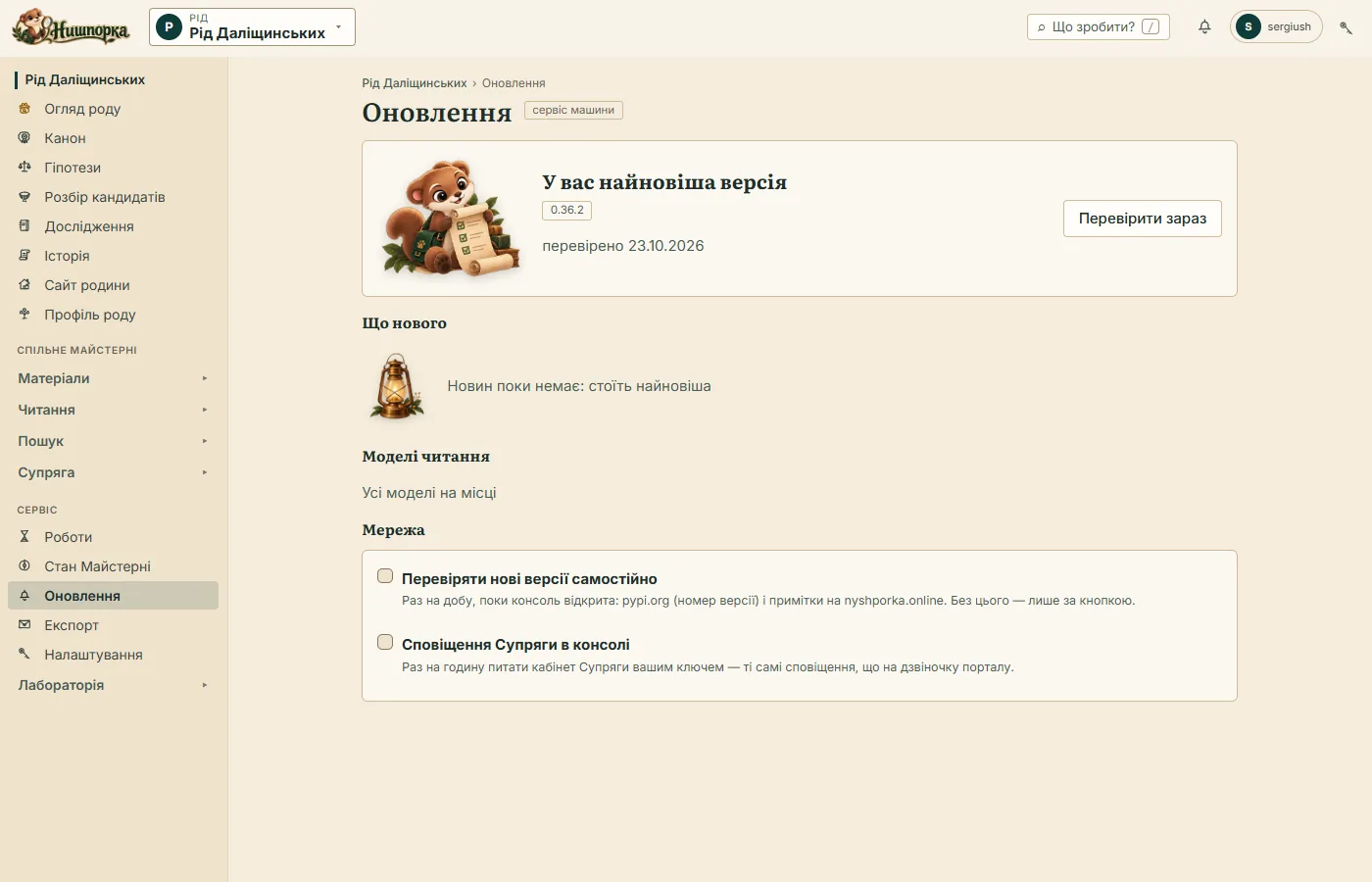
Without your permission Nyshporka contacts nothing, and the bell is no exception. The check itself is off: Nyshporka looks for something new only when you press “Check now”. If you want it to check by itself, turn on one or both switches in Settings → Network:
- new versions — once a day, while Nyshporka is open;
- Supriaha notifications — once an hour, with your Supriaha key.
Feedback straight from Nyshporka
Found a bug or have an idea — write to us right from the app. The “Feedback” button is in the Supriaha menu in the header and in Settings. You can also tell the assistant: “send feedback to the developers: …”.
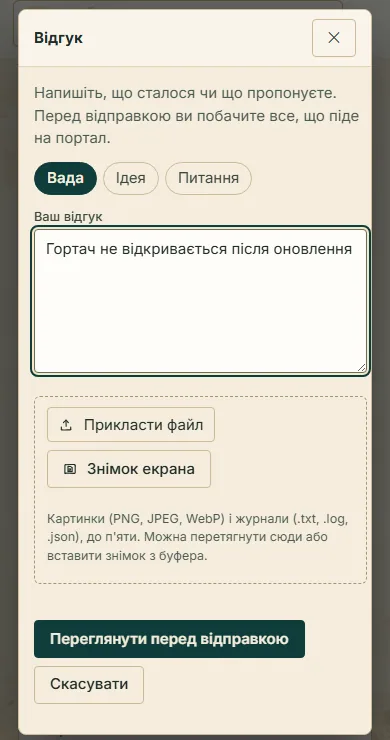
- A bug, an idea or a question. Write in your own words what happened or what you suggest.
- Screenshots and logs. Up to five files: images (PNG, JPEG, WebP) and text logs (.txt, .log, .json). You can choose a file, drag it into the window, paste a screenshot from the clipboard or make one with the “Screenshot” button.
- Preview first. Before sending, Nyshporka shows exactly what will go: your text, the screenshots, the beginning and end of each log and a short note about the machine (Nyshporka version, system, way of installation). The note can be removed with one tick.
- Nothing extra about you. Paths with your name and folder names are replaced with labels by Nyshporka on your own computer, and email addresses and keys are cut out of the logs. Screenshots are shrunk, and the file's technical data, including coordinates, is removed from them.
- The reply comes to the bell. You can send feedback when you are signed in to Supriaha. The reply will appear in Nyshporka's bell and on the “My feedback” page in your account.
The assistant sends feedback the same way, through the preview: first it shows you what will go, and sends only with your consent.
Faster search
In a single case — in all of them, right after the update. A surname search is twice as fast, and what it finds is the same. A case of 1,053 pages is searched in 6.5–7 s instead of 15–19 s. Pattern search (text grep) is also twice as fast.
In a large body of read text the search time grew with the corpus. On three million pages a family surname took about 17 minutes. For such volumes a fast index has appeared: in seconds it finds the lines where the surname may stand, and scores only those.
Important: the fast index is not installed with the update. Without it, search across a large body of read text runs as in 0.36: the same finds, the same time. The figures in the tables below are with the index only.
To install it, tell your assistant: “install the fast search index”. It will add the needed package and build the index once (
nysh text index --fast). After that the index keeps up with new read text by itself.Before installing, check the free disk space. The index is big: 7–9 GB for every million read pages. It lies next to the read texts, on the same disk, and adds to the space the read texts already take.
Read Space for the index First build 411 thousand pages 2.8 GB 19 min 3.4 million pages 30 GB hours If your read text is under 200 thousand pages, you do not need the index: at that size it does not switch on, because ordinary search is fast anyway. The index can be deleted at any time, and search will go the ordinary way.
| Search across ~3 million pages | Without the index | With the index |
|---|---|---|
| Family surname, 22 spellings | ~17 min | 2.4 min |
| Ковальський | 12.2 min | 2.1 min |
| Мельник | 4.2 min | 1.7 min |
We checked that the index does not lose real mentions. We took 115 mentions of the family, checked by eye in the metrical books of DAViO f.904 op.24. The old search found 111 of them, the new one 110. The difference is one scan: there the old search “found” a random word, not the surname. The number of pages that need a look by eye went down to 1,848 from 4,353.
An installed index switches on by itself when the search covers 200 thousand pages or more.
| Search across 411 thousand pages (DAViO and DAZhO) | 0.36 | 0.37 |
|---|---|---|
| Мельник across all read text, with the index | 53 s | 8 s |
| Даліщинський across all read text, with the index | 87 s | 5 s |
| A surname in a single case, in all of them | 6.4 s | 2.7 s |
Pattern search (text grep), in all of them |
3.7 s | 1.9 s |
If a search finds nothing, that “nothing” is checked by a full search without the index. So “none” means none, not “the index missed it”.
Two words side by side
Often people search not for one word but for a pair: a name with a surname, a surname with a village, a name with a patronymic. Now you can do that:
nysh text near "Ковальський" "Іван" --case <справа>
nysh text near "Ковальський" "Городківка" --window 3
nysh text near "Іосиф" "Кирил" --follow
Nyshporka finds the places of the first word and looks for the second only nearby, in the same or the neighbouring line. Both words are searched in all their spellings: a name together with its old forms, a surname as it is recorded in the family profile. With --follow the second word must stand right after the first, like a name and a patronymic. In a case of 1,093 pages this left 6 pairs instead of 78, and all six are genuine.
Fewer cards to review
The candidate viewer (nysh text sheet) now sorts the finds by itself:
- for your verdict — what you need to look at;
- weak — the second model read something else in the same line;
- already known — the sheet is already in the canon or in the records, or it is a priest's signature under an entry;
- closed: not a surname — only a name in a list, a village name or an empty place.
Nyshporka closes nothing on the shape of a word. What is known and what is closed lies collapsed, with the reason, so it can always be expanded. In a case with the family priest's signatures (638 finds), 9 cards out of 60 were left for your verdict.
In “Candidate review” in the console, under each find there are now three buttons besides “Ours”: “Another surname”, “Not a surname” and “Unreadable” (the X key is “not a surname”). The verdict goes into the records, and next time this find will not come up for review again.
Change history
Nyshporka now keeps the history of your workspace by itself. Every checked edit to the canon, the sheet records or the verdicts is saved. The “History” screen shows what changed in a person's card, field by field, and the “Restore” button rolls a card back to any earlier version.
The history lies only on your computer and is sent nowhere. Whoever keeps git themselves can turn it off: nysh history auto off.
Licences
The Nyshporka code, as before, is open under AGPL-3.0. What changed are the terms for the reading models and for new texts in Supriaha.
- Reading models released before 0.37 stay under CC BY-SA 4.0 for good: Pysar up to and including v28, Diak, Diak-Litopysets up to v10, Skryba and Skryba PP. They can still be used in any way, commercially too.
- New models (new versions of Pysar, Diak-Litopysets, Skryba PP, and also Logofet, Regent and Pysar XVIII) come out under CC BY-NC-SA 4.0 with an additional permission. A genealogist who does paid research alone, including on commission from clients, may use them freely. A written permission is needed to build the models into someone else's product, service or program for others. Commercial licence: [email protected].
- Texts in Supriaha. New contributions go by default under CC BY-NC-SA 4.0 instead of CC0. If you did not choose a licence, your profile will switch to the new one by itself. If you want to stay on CC0, use
nysh share setup --license CC0-1.0. What has already been given stays under the licence you gave it with. - Bulk downloading of Supriaha texts for commercial purposes is forbidden — by scripts, bots or through the API, beyond the needs of your own research.
Full terms: the models licence and the “Licences” section on the page about Nyshporka.
Fixed
- Cloud reading that stayed “reading” forever. On one workspace more than four thousand “live” readings had piled up that had long since finished. Now Nyshporka checks each one and closes the finished ones.
- Nothing on drive C:. Cloud rental records go into the data folder you chose in the installer.
- Line crop (
nysh text crop) and the viewer for 60 cards no longer hang for minutes: it is now a minute instead of over ten. - Buttons that did nothing. We went through all the screens and fixed those that stayed silent or did the wrong thing, from “Refresh” to the verdict form.
- The antivirus no longer calls the installer a trojan. The installer sets up the needed tool from a verified archive, not with a command from the internet, which Microsoft Defender mistakenly flagged as malicious.
- ARCHIUM catalogues in a fresh installation. Whoever installed Nyshporka after 3 October got an error in ARCHIUM search and descriptions: a library they relied on had been updated. Now everything works.
- The family site builds right after installation. Until now a part was missing for it that the installer did not set up. Now it is installed together with the “Research” section, in Docker too.
- The fast search index does not vanish after an update. If you installed it, the update keeps it.
- A scans folder added in Settings got lost. Nyshporka said “✓”, and the Case library stayed empty. Now the folder is recorded where it belongs, and one that got lost earlier Nyshporka finds and moves by itself.
- Search in read texts crashed in the “Basic” installation as soon as the first read text appeared. Fixed.
- TsDIAK on ARCHIUM returned error 403 instead of a case. Now the case opens, and a book that is no longer on the site Nyshporka remembers and does not offer to download a second time.
- The installer on laptops with an ARM processor failed while building the encryption library. Now it installs a Python for which this library is already built.
- After moving a family into a project there is no longer a warning about “untracked files”.
How to update
- Update:
nysh updateor a newnyshporka-setup.exeover the old one. Later releases can already be installed with the “Update now” button. - Tell your assistant (Claude or Codex): “move to the new version”. It will run
nysh migrateand find out what changed. - Move your family into a project: with the assistant or with the “Move…” button on the family overview — step-by-step guide. This is required for everyone who installed Nyshporka earlier.
If you search a large body of read text (from 200 thousand pages), install the fast index after the update — how, is written in the section “Faster search”. It does not install itself.
After the update, take the survey in your Supriaha account (it will appear two weeks after the release): what appeared on time, and what gets in the way. We will build the next big release from your answers.